

What Is 365in App?
365in App is an Android application that provides access to 365in Game and its collection of online games. The app features Aviator, JILI Games, Slots, Rummy, Andar Bahar, Fishing, Mines and other casino-style titles through a mobile interface.
The 365in App includes HOT, CASINO, SLOT, GAMES and FISHING categories, with SPORTS also appearing in some app screens. Game providers and collections include JILI, Evolution, KoolBet, TopBet and SABA Sports. Users can browse featured titles and access account features from the dashboard.
In addition to games, the app provides SMS OTP verification, Password Login, wallet management, promotional activities and account settings. These functions are organised into separate sections for game browsing and account management.
365in App Highlights
- Android Application: Access 365in Game through its Android APK.
- Multiple Games: Explore Aviator, Fortune Gems, Super Ace, Rummy, Andar Bahar, Chicken Road 2, Mines and fishing titles.
- Organised Game Lobby: Browse HOT, CASINO, SLOT, GAMES and FISHING categories.
- Mobile Verification: Register or sign in using a mobile number and SMS OTP.
- Password Login: Create and manage a password through My Profile → My Info → Login Password.
- Wallet Management: Access Deposit, Withdraw, Cash Balance, Withdrawable Balance and Balance Records.
- Rewards Section: Explore First Deposit, Lucky Wheel, VIP, Ranking and Referral activities.
- Account Settings: Manage profile information, login credentials and available security settings.
365in App Experience
App experience: The home screen displays featured games, promotional banners, game categories and account balance information. Users can navigate between HOME, PROMO, EARN and MINE from the bottom menu. The central reward-wheel shortcut displays a promotional activity.
Account settings are available through the profile section, while Deposit and Withdraw shortcuts appear on the dashboard. The selection of games and interface features may change with app updates. For information about this website, visit the About page; for independent coverage of the game interface, see the 365in Game Review.
365in App Information
The 365in App is an Android application available in APK format. It provides access to the game lobby, mobile account features and available game collections. The following box summarises the listed application details.
The APK filename is a listed reference, not an independently confirmed downloaded filename. Check the current destination for release details; the newest version has not been independently verified.
365in App Features
The 365in App combines different online game categories with mobile account management, security settings, wallet functions and reward activities. Its organised dashboard allows users to explore games and access important account options from a single Android application.
Main Features of 365in App
The 365in App provides a category-based game lobby with HOT, CASINO, SLOT, GAMES and FISHING sections, with SPORTS visible in some app screens. Users can browse available titles and move between different game collections.
The application includes Aviator, JILI Games, Slots, Rummy, Teen Patti, Fishing, Mines and Dragon Tiger 2. Each game follows its own rules, controls and playing format.
365in supports mobile-number verification through SMS OTP. This feature is used during account registration, mobile binding and certain account-security activities.
Registered users can create a login password through My Profile → My Info → Login Password. The saved password provides an account-access option for returning users.
The Wallet section provides access to Deposit, Withdraw, Cash Balance and Withdrawable Balance information. Users can review the available payment options and account records.
The withdrawal section includes options to add or select a receiving bank account. Users can enter the account holder’s name, account number and IFSC when linking their bank details.
365in includes First Deposit, daily activities, Ranking and Referral reward programmes. The availability of benefits depends on the applicable offer conditions.
My Profile → My Info provides account details, Login Password settings and other available account-management options.
365in App Navigation
The bottom navigation provides four main areas for browsing and account access:
- HOME: Browse featured games, category sections and available titles.
- PROMO: Explore current promotional offers and activities.
- EARN: Access referral and invitation-related functions.
- MINE: Open profile, account and wallet-related options.
Deposit and Withdraw shortcuts are also available on the dashboard. The exact position of a feature can differ between releases.
Games Available in 365in App
The 365in App provides access to different online game categories, including crash games, slots, card games and arcade-style titles. Users can explore the available games from the main lobby and select their preferred game format.
Popular Games in 365in App
Aviator, Aviator Pro, Spribe Aviator and Chicken Road 2 feature multiplier-based or quick-round gameplay.
The JILI collection includes Fortune Gems, Fortune Gems 2, Fortune Gems 3, Super Ace and Money Coming.
Reel-based titles such as Crazy777, Fortune Garuda and Fortune Coins 2 use different themes and symbols.
Rummy and other card-based games use different rules, sequences and combinations.
Teen Patti and Andar Bahar offer card-game formats with different outcomes.
Fishing games use arcade-style controls and moving targets.
Grid-based games featuring hidden mines and tile selections.
A card-based game listed among the visible 365in game titles.
365in App Game Categories
- HOT: Featured and highlighted titles.
- CASINO: Casino-style games with different formats.
- SLOT: Reel-based and slot-style games.
- GAMES: Available card games and other formats.
- FISHING: Arcade-style fishing titles.
- SPORTS: Sports-related collections visible in some app screens.
Exploring the Game Lobby
Players can browse the available categories from the 365in App home screen, select a game and review its rules before participating. Available collections include providers such as JILI, Evolution, KoolBet, TopBet and SABA Sports. Each game has its own controls, rules and result system.
The game collection may change as new titles become available or existing games are updated.
365in App Download for Android
365in App Download allows Android users to obtain the 365in Game application through its APK download process. The 365in Download button opens an external referral destination rather than delivering the APK directly from this website. The destination asks users to enter an active mobile number and select Play Now before proceeding to the available download instructions.
After completing the mobile-number confirmation, users can download the 365in APK file and find it in their Android device’s Downloads folder or File Manager.
How to Download 365in App
- Tap the 365in Game Download button.
- Enter your active mobile number on the download page.
- Check the entered number and select Play Now.
- Follow the displayed instructions to download the APK.
- Allow the browser to complete the download.
- Open Downloads or File Manager to find the downloaded file.
365in App Download Requirements
- Android Device: A compatible Android smartphone.
- Internet Connection: A working connection to access the download destination.
- Available Storage: Enough free space for the APK and installation.
- Active Mobile Number: A number available for the download confirmation and later account verification.
- Browser Access: A browser that supports APK file downloads.
Where to Find the Downloaded 365in App
- Chrome Downloads: Open Chrome and select Downloads.
- Android Downloads Folder: Look for the downloaded APK in the device’s Downloads directory.
- File Manager: Open Files or File Manager and find the downloaded package.
- Download Notification: Use the completed download notification if available.
Mobile Confirmation During Download
Two separate stages: The 365in download page requests a mobile number before providing access to the APK file. This confirmation is separate from the SMS OTP verification used for account registration after installation.
Always check the download destination and review browser security warnings before accepting an APK file. Do not bypass malware warnings or disable device protections to complete a download.
After the file is downloaded, the next step is to install the 365in APK on a compatible Android device.
365in APK Download and Installation
365in APK is the Android installation package used to install the 365in Game application on a compatible smartphone. After downloading the file, users can open it through their device’s Downloads folder or File Manager and follow the Android installation process.
This section covers installation, Android permission prompts and checking the installed package. For the mobile-number download process, see 365in App Download for Android; installation requirements can differ by device and operating system.
How to Install 365in APK on Android
- Open Downloads: Go to the Downloads folder or File Manager on your Android phone.
- Locate 365in APK: Find the completed 365in application package.
- Open APK File: Tap the file to begin installation.
- Review Permissions: If Android displays an installation permission request, review the source and security information carefully.
- Install Application: Select Install only if you trust the downloaded package.
- Wait for Installation: Allow Android to complete the installation.
- Launch 365in App: Tap Open to start the application.
- Access Account: Complete the required mobile verification or use your existing login credentials.
365in APK Installation Requirements
- Android Compatibility: The downloaded APK must support the device’s Android version.
- Storage Space: Enough free space must be available for installation and application data.
- Complete APK File: The downloaded package should not be incomplete or damaged.
- Trusted Download Source: Verify the download destination before opening the APK.
- Installation Permission: Review Android’s permission request for the browser or File Manager.
Android APK Installation Permissions
- Open the downloaded APK file.
- Read the installation permission message.
- Check which application is requesting permission.
- Allow installation only when the source and file are trusted.
- Keep Android security protections enabled.
Android security: Do not bypass Android malware warnings or disable Play Protect to install an unverified application.
How to Check an Installed 365in APK
- Open Settings on the Android device.
- Select Apps or App Management.
- Find the installed 365in application.
- Open App Info to review available details.
- Check the displayed version, storage usage and permissions where supported.
The installed package details should be compared with the information supplied by the intended download source.
365in APK Installation and Account Access
- APK Installation: Adds the 365in application to the Android device.
- Mobile Binding: Links a verified mobile number to the 365in account.
- OTP Login: Provides account access through SMS verification.
- Password Login: Allows returning users to sign in using a saved password.
After installation, choose the account-access method displayed on the login screen. For full OTP registration, password setup and account recovery instructions, see the 365in Login and Registration Guide.
365in APK Security Checklist
- Download the APK from a source you can verify.
- Review the file and Android installation warnings.
- Avoid modified APKs that promise guaranteed results.
- Check application permissions before granting access.
- Keep passwords, OTPs and banking credentials private.
- Use Android security features to review unfamiliar applications.
Installation alone does not verify the APK publisher or integrity. The Safety and Compatibility section explains device checks and permission review.
How to Navigate 365in App
The 365in App features an organised dashboard that brings together game categories, account settings, wallet options and reward activities. Users can navigate between different sections to explore games, manage their profiles and access available app features.
The bottom menu shows HOME, PROMO, EARN and MINE. HOME is used to browse games, PROMO displays activities, EARN offers invitation-related features, and MINE provides account options.
365in App Home Screen and Game Lobby
- HOT: Explore featured and highlighted games.
- CASINO: Browse casino-style games and available tables.
- SLOT: Browse available slot and reel-based titles.
- GAMES: Access available card games and other formats.
- FISHING: Explore interactive fishing games.
- Game Providers: Browse JILI, Evolution, KoolBet, TopBet and SABA Sports collections.
Select a category or game title to explore available options. The displayed game selection may change with app updates.
My Profile and Account Settings
- My Info: Access available account protection options.
- Login Password: Create or manage the account login password.
- Mobile Verification: Use the registered number for required SMS verification.
- Account Details: Review the profile information displayed in the app.
Account Security Path: My Profile → My Info → Login Password
Wallet and Balance Navigation
- Deposit: Access the available payment methods.
- Withdraw: Open the withdrawal request screen.
- Cash Balance: Review the balance shown in the account.
- Withdrawable Balance: Check the amount currently eligible for withdrawal.
- Bank Account: Add or select a receiving bank account where supported.
Users should review their transaction details and available limits before making payment-related decisions.
Bonus, Rewards and Referral Sections
- First Deposit Bonus: Review introductory deposit-related offers.
- Daily Rewards: Check the available daily reward activities.
- Ranking Rewards: View current ranking-related offers.
- Referral Rewards: Access invitation information and eligible referral benefits.
Each activity has its own eligibility requirements and conditions. Check the current in-app offer details rather than relying on screenshots of earlier promotions. For common account questions, visit the 365in Game FAQ.
365in App Interface Screenshots
These four app screenshots illustrate mobile download confirmation, OTP login, the game lobby and the withdrawal interface. Together they show where download, account access, games and wallet information appear.
- Download interface: Mobile-number confirmation and Play Now screen.
- Login interface: Mobile number and SMS verification screen.
- Game lobby: Categories, featured games and provider tiles.
- Wallet interface: Withdrawable balance, bank-account controls and withdrawal options.
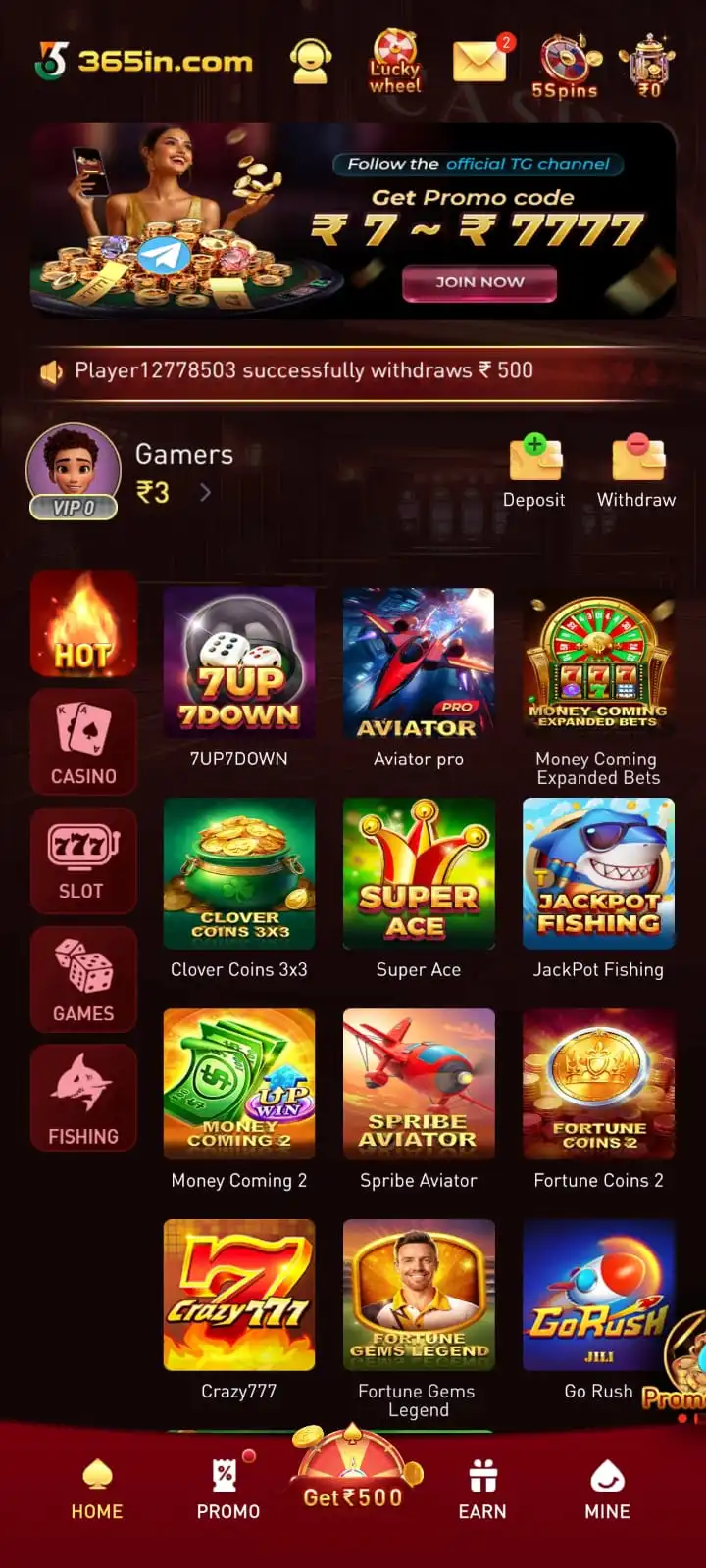

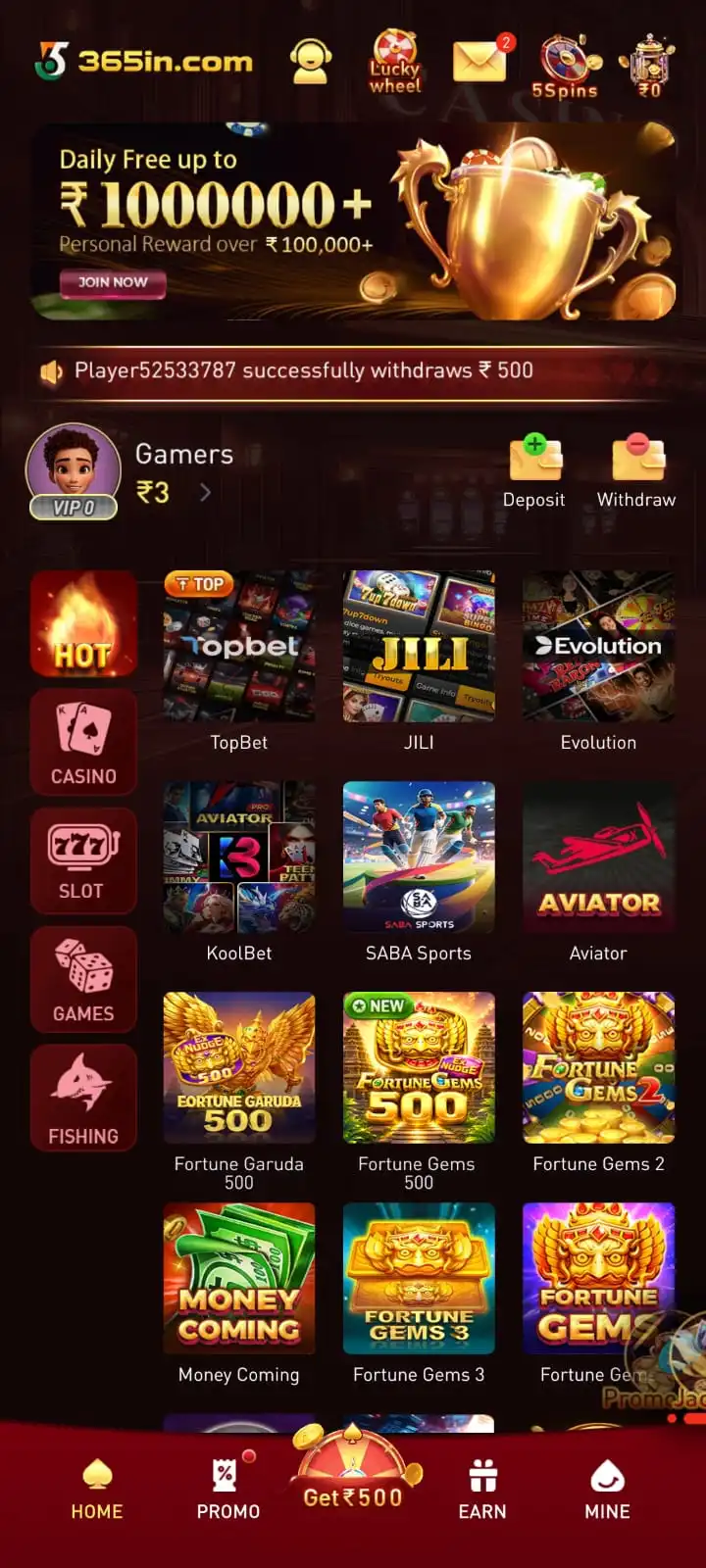
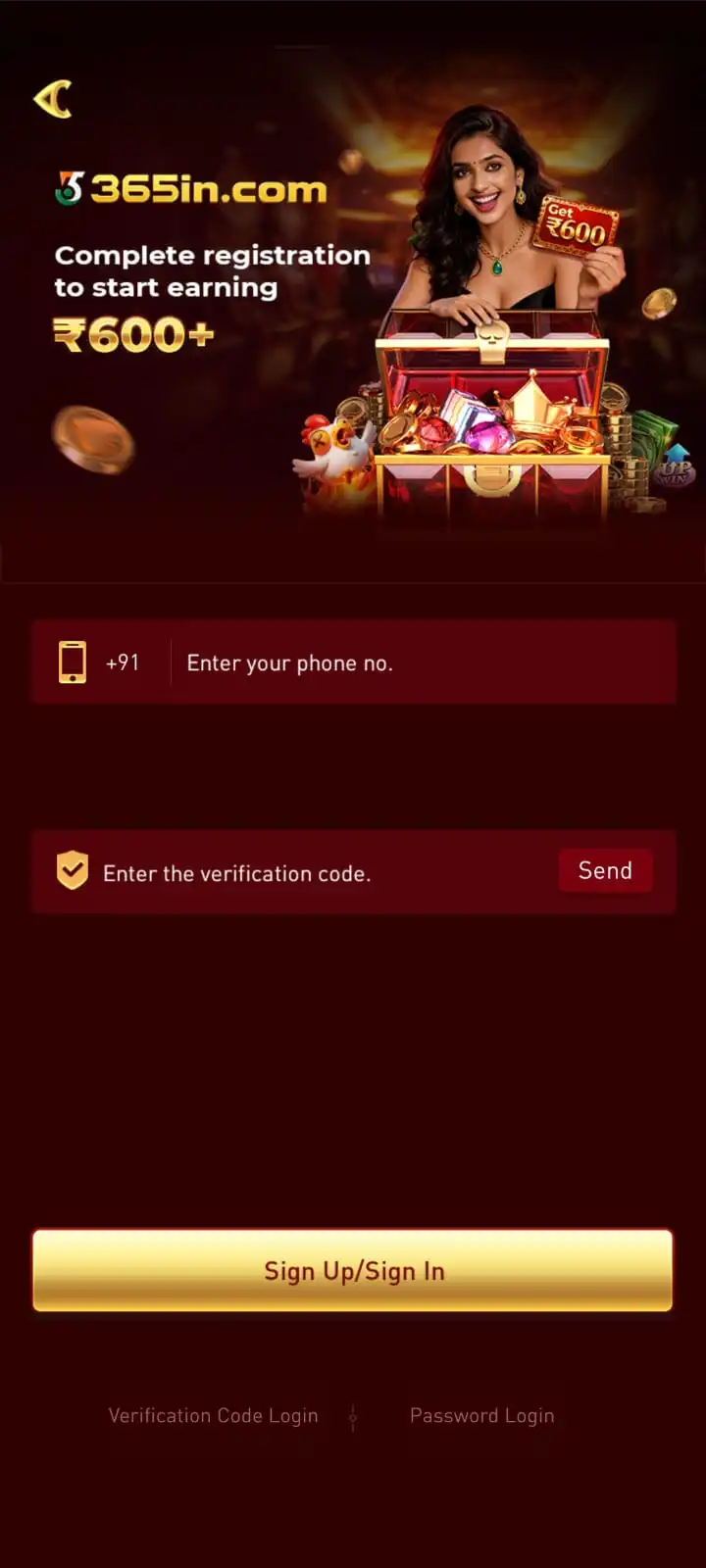
These screenshots provide a visual reference for locating app features. Menu labels, layouts and available options may differ between application releases.
365in App Registration and Login
The 365in App allows users to register and access their accounts using a mobile number and SMS verification. New users can complete mobile binding through the Verification Code Login option, while returning users can access their accounts using a saved password.
The application provides separate options for mobile verification and password-based account access.
How to Register on 365in App
- Open 365in App: Launch the installed application on your Android device.
- Select Verification Code Login: Choose the mobile verification option.
- Enter Mobile Number: Enter your active mobile number under the +91 country code.
- Request OTP: Tap Send to receive an SMS verification code.
- Verify Number: Enter the received OTP in the verification field.
- Complete Registration: Tap Sign Up / Login to access your 365in account.
365in App Login Using Password
Returning users who have already created a password can use the Password Login option.
- Open 365in App.
- Select Password Login.
- Enter the registered mobile number.
- Type the saved login password.
- Tap Sign Up / Login to access the account.
How to Set 365in App Login Password
Account Path: My Profile → My Info → Login Password
- Open My Profile after signing in.
- Select My Info.
- Tap Login Password.
- Enter the registered mobile number.
- Request and enter the SMS verification code.
- Create a password containing 8–32 characters.
- Enter the password again in Confirm Password.
- Tap Complete to save the password.
365in App Mobile Binding
Mobile binding connects the verified phone number to the 365in account.
- Registered Mobile Number: Use the number linked to your account.
- SMS Verification: Keep the registered SIM active for receiving verification codes.
- Password Access: Use the saved password for returning login.
- Account Recovery: Keep access to the registered number for password-related verification.
- OTP Security: Never share verification codes or login credentials.
Download Confirmation and Account Verification
APK download confirmation and in-app SMS OTP verification are separate processes. Confirming a mobile number during download does not automatically register an account. Return to the download instructions for the Play Now steps instead of repeating them here.
For complete password recovery and account-access instructions, read the 365in Login and Registration Guide.
365in App Wallet and Rewards
The 365in App provides wallet and rewards shortcuts alongside its main game lobby. This overview explains which features are available and where to find them. For full payment instructions, visit the 365in Deposit and Withdrawal Guide.
365in App Wallet Features
Cash Balance and Withdrawable Balance can differ according to the signed-in account and applicable conditions. The separate Deposit and Withdrawal Guide explains payment procedures and bank details.
Deposit Options in 365in App
Open Wallet → Deposit to see the amounts and payment methods currently available. The observed app interface shows Paytm, PhonePe and QR Code options. Check the recipient, payment amount and displayed instructions before proceeding.
The deposit interface also provides payment status information. Detailed amount selection, payment confirmation and reference-number guidance are covered on the dedicated Deposit and Withdrawal page.
365in App Withdrawal Features
Open Wallet → Withdraw to review the Withdrawable Balance, available bank accounts and withdrawal conditions. The Add New Account option is used to enter receiving bank information when needed.
Withdrawal limits and turnover conditions can vary by account. For bank-account setup and full withdrawal steps, see the 365in Deposit and Withdrawal Guide.
365in App Bonuses and Rewards
Review the current introductory offer and its eligibility conditions in the app.
Check available daily activities and applicable claim rules.
Access invitation activities and any qualifying benefits.
Explore VIP, Lucky Wheel and ranking-related activities shown in the app.
Promotional availability and eligibility conditions depend on the current offers. This page focuses on accessing app features rather than repeating detailed bonus terms.
Important Wallet and Reward Conditions
- Wallet Balance: Review cash and withdrawable funds separately.
- Payment Methods: Check the options currently displayed for the account.
- Bank Details: Confirm the receiving bank account before requesting a withdrawal.
- Reward Eligibility: Review the terms attached to each activity.
- Transaction Records: Retain payment references and check the recorded status.
- Account Security: Do not share passwords, OTPs or UPI PINs.
Payment and reward functions are subject to the conditions displayed for the signed-in account.
365in App Latest Version
The 365in App is available as an Android APK package that provides access to the game lobby, account settings, wallet features and available game collections. Check the current 365in Download destination for release details before installing or replacing an existing version.
App updates may change the interface, game collection, security settings or other features. Compare the release information with the app already installed on your device.
365in App Version Details
- Available APK: Access the package provided through the current download page.
- Android Compatibility: Check whether the APK supports your Android device.
- Game Collection: Browse games and categories included in the installed app.
- Account Features: Access mobile verification, Password Login and profile settings.
- Wallet Features: Review the available balance and account options.
- App Updates: Check the download destination for release changes.
How to Check the Installed 365in App Version
- Open Settings on your Android smartphone.
- Select Apps or App Management.
- Find and select 365in Game.
- Open App Info and review the version details, where available.
- Compare the installed version with the information shown at the download source.
How to Update 365in App on Android
- Check the current download destination for an available update.
- Review the release information and verify the APK source.
- Compare the available package with the version already installed.
- Follow Android installation instructions if a compatible update is available.
- Open the app after installation and review available features.
An update may require a matching package signature. Uninstalling an app can remove locally stored data, so review the device's app data and update instructions first. For the listed version and file size, see 365in App Information.
365in APK Safety and Compatibility
The 365in APK is an Android installation package for accessing the 365in Game application on compatible smartphones. Before installing, check device compatibility, available storage and application security information.
Requirements can vary depending on the operating system, manufacturer and downloaded package. The minimum Android version, RAM requirement and supported-device list have not been independently verified.
365in APK Compatibility
- Android Device: Use a compatible Android smartphone.
- Android Version: Confirm the package supports the operating system installed.
- Available Storage: Keep sufficient space for the app and its data.
- Internet Connection: Connect to download and access online features.
- Mobile Number: Keep an active number for SMS account verification.
- Installation Support: Confirm the device can install the intended package.
365in APK Safety Tips
- Verify the Source: Review the APK download destination before using it.
- Review Warnings: Do not bypass Android malware alerts.
- Keep Play Protect Enabled: Maintain device security protections.
- Check Permissions: Review the application's permission requests.
- Avoid Modified APKs: Do not rely on packages promising guaranteed outcomes.
- Protect Credentials: Never share OTPs, passwords or banking credentials.
- Check Package Details: Compare information with the intended source.
Successful installation alone does not confirm that a package is safe. For earlier Android installation steps, see 365in APK Download and Installation.
Before Using 365in App
- Open the App: Launch the installed 365in Game application.
- Verify Your Account: Use SMS OTP or existing Password Login.
- Browse Games: Open the game lobby and available categories.
- Review Settings: Check MINE or My Profile for account options.
- Check Wallet Information: Review balance and account-related features when needed.
- Understand Rules: Read participation conditions and financial risks for games involving stakes.
For installation guidance, see 365in APK Download and Installation. For information about risks involved in stake-based games and account decisions, visit Responsible Gaming.