
Table of Contents
- What Is 365in Game?
- 365in Game Information
- 365in Online Games and Game Categories
- 365in Game Key Features
- 365in Game Bonuses and Rewards
- 365in Game Download and APK Installation
- 365in Game Registration and Mobile Binding
- 365in Game Login and Password Setup
- 365in Game Deposit, Withdrawal and Wallet Guide
- 365in Game Review and User Experience
- Frequently Asked Questions
What Is 365in Game?
365in Game is an Android-based online gaming platform featuring different game categories, including Aviator, JILI Games, Slots, Rummy, Teen Patti, Fishing, Mines and casino-style games. The app combines card games, slot titles, multiplier-based games and interactive arcade games in one place.
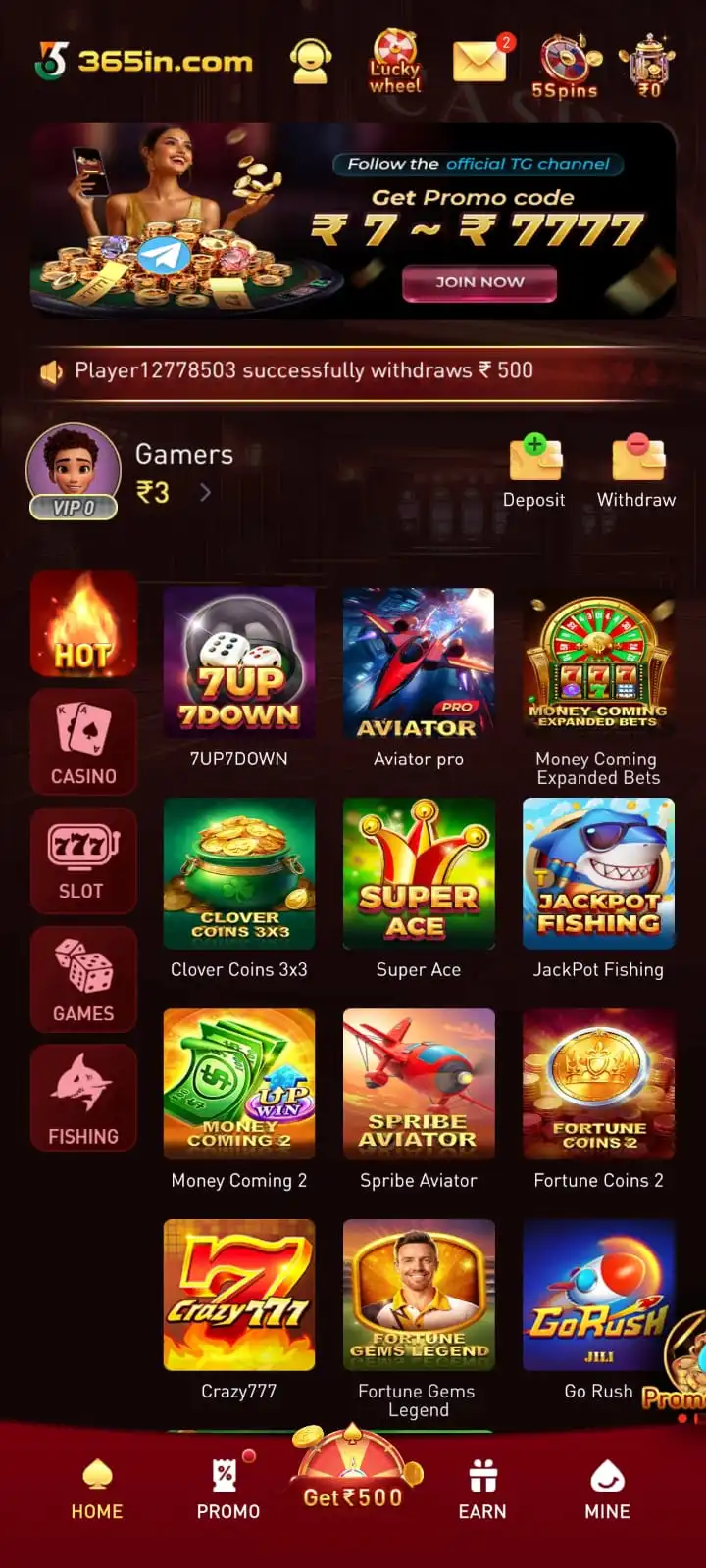
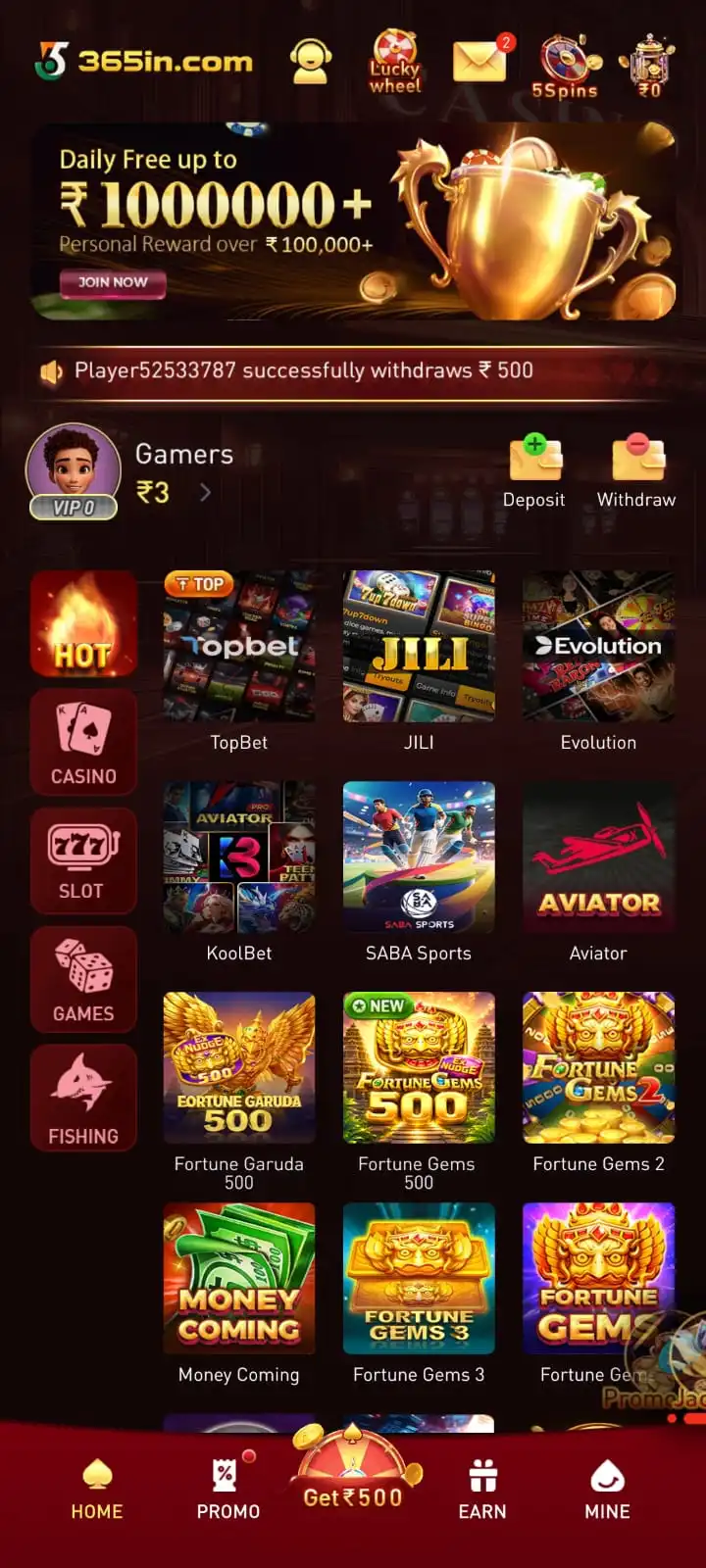
The 365in Game lobby is organised into HOT, CASINO, SLOT, GAMES and FISHING categories, with SPORTS also visible in some app screens. Players can browse available games, select a category and review individual game rules before participating.
Popular Games Available in 365in
- Aviator & Crash Games: Aviator, Aviator Pro and Spribe Aviator feature multiplier-based gameplay.
- JILI & Slot Games: Fortune Gems, Fortune Gems 2, Fortune Gems 3, Money Coming and Super Ace are among the visible titles.
- Card & Casino Games: Rummy, Andar Bahar, Dragon Tiger 2 and other casino-style games.
- Mines & Quick-Round Games: Mines, Vortex, Crazy Time and Funky Time offer different game mechanics.
- Fishing Games: Jackpot Fishing, Shade Dragons Fishing and other arcade-style fishing titles.
- Other Games: Chicken Road 2, Pappu, Crazy777 and Fortune Garuda 500 are also visible in the game lobby.
365in Game Experience
365in brings together quick-round games, card games, slot titles and arcade-style games through a category-based interface. The main lobby also displays game providers such as JILI, Evolution, KoolBet, TopBet and SABA Sports.
Players can explore the available games, access account features and review the rules of individual titles. Game results are uncertain, and no strategy can guarantee winnings.
365in Game Information

- Game Name
- 365in Game
- APK File
- 365in.apk
- Version
- 3.5.1
- APK Size
- 25.25 MB
- Platform
- Android
- Game Categories
- HOT, CASINO, SLOT, GAMES, FISHING, SPORTS
- Popular Games
- Aviator, Fortune Gems, Super Ace, Rummy, Andar Bahar, Chicken Road 2, Fishing
- Game Providers
- JILI, Evolution, KoolBet, TopBet, SABA Sports
- Login & Registration
- Mobile Number, SMS OTP Verification, Password Login
- Account Features
- My Profile, My Info, VIP, Balance Records, Live Support
- Wallet Options
- Deposit, Withdrawal, Bank Account
- Payment Options
- Paytm, PhonePe, QR Code
- Bonuses & Rewards
- First Deposit, Lucky Wheel, Ranking, Referral, VIP
365in Online Games and Game Categories
365in Game offers a variety of online games, including Aviator, JILI Games, Slots, Rummy, Teen Patti, Fishing, Mines, other quick-round titles and casino-style games. The Android app brings together different game formats through a category-based lobby, allowing users to browse available titles in one place.
Popular Games in 365in
- Aviator & Crash Games: Aviator, Aviator Pro, Spribe Aviator and Chicken Road 2 feature different quick-round and multiplier-based gameplay formats.
- JILI Games: Fortune Gems, Fortune Gems 2, Fortune Gems 3, Super Ace and Money Coming.
- Slot Games: Fortune Garuda 500, Fortune Garuda 1000, Fortune Coins 2, Crazy777 and other reel-based titles.
- Rummy & Card Games: Rummy, Teen Patti, Andar Bahar and Dragon Tiger 2.
- Fishing Games: Jackpot Fishing, Shade Dragons Fishing and other interactive fishing titles.
- Mines & other quick-round titles: Quick-round games featuring grid selection and ball-drop mechanics.
- Casino Games: Crazy Time, Funky Time and other casino-style games.
- Other Games: Pappu, Vortex, Go Rush and additional titles displayed in the game lobby.
365in Game Categories
The 365in Game lobby includes the following categories:
- HOT: Featured and popular games.
- CASINO: Casino-style games, card tables and live game collections.
- SLOT: Reel-based slot games from different providers.
- GAMES: Interactive games, quick-round titles and additional game formats.
- FISHING: Arcade-style fishing games.
- SPORTS: Sports-related games and available sports sections.
Players can select a category to browse its available titles and explore games from providers such as JILI, Evolution, KoolBet, TopBet and SABA Sports.
365in Game Interface and Account Features
The Android app includes a game lobby with featured titles, provider sections, game categories and promotional banners. Users can browse the available games, select a title and access different account features through the application interface.
The account area provides access to My Profile, My Info, VIP, Balance Records and Live Support. Separate wallet options allow users to open Deposit, Withdraw and Bank Account sections.
The interface also includes promotional activities such as First Deposit offers, Lucky Wheel, Ranking Rewards and Referral Rewards.




365in Game Key Features
365in Game combines multiple online game categories with mobile account access, wallet management, promotional activities and account settings. The Android app provides separate sections for browsing games, managing login details, reviewing balances and accessing support.
Main Features of 365in Game
- Multiple Game Categories: Explore HOT, CASINO, SLOT, GAMES, FISHING and SPORTS sections featuring Aviator, JILI Games, Rummy, Andar Bahar, slots and other available titles.
- Organised Game Navigation: Browse featured titles, game providers and category-based collections directly from the main lobby.
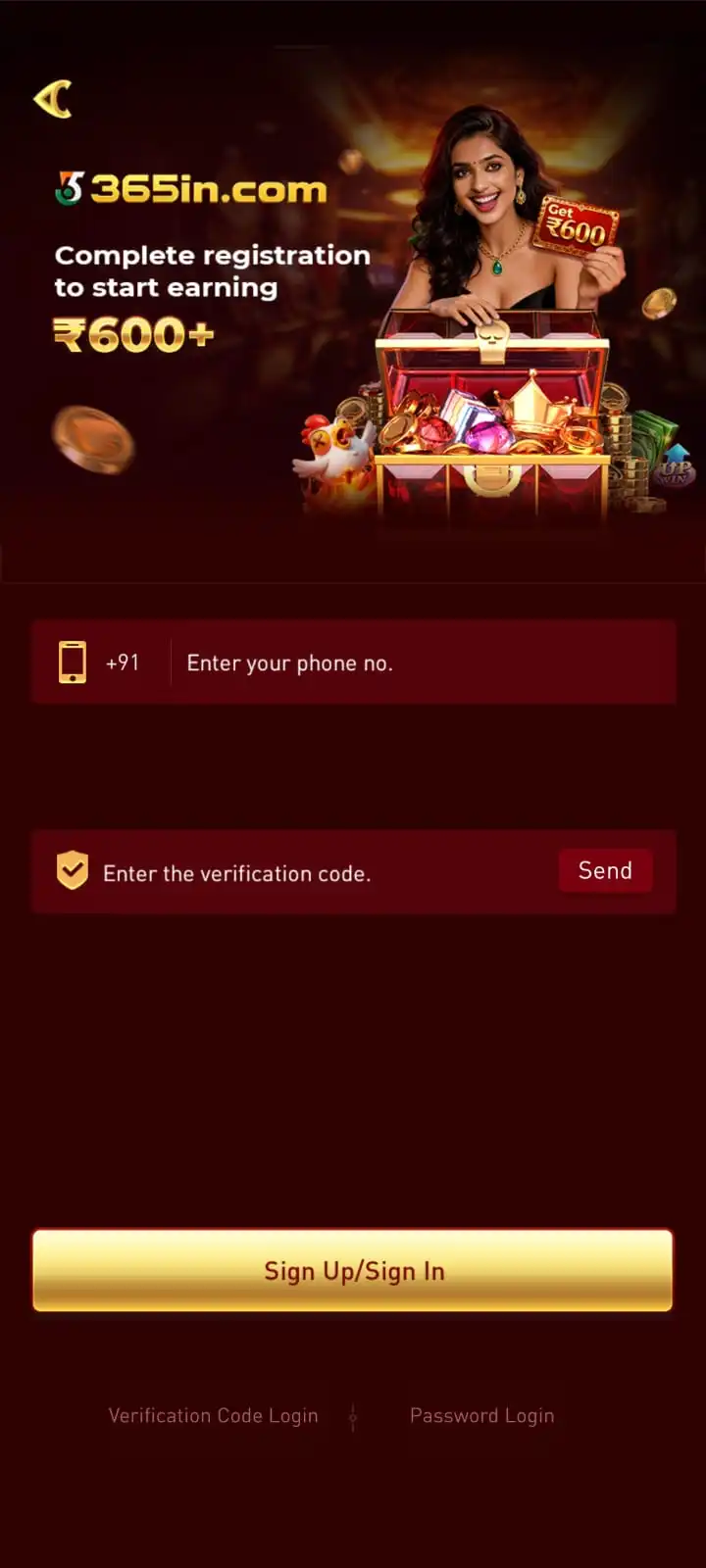
- Mobile Account Access: Register or sign in using an active mobile number and SMS OTP verification.
- Login & Security: Use Verification Code Login or Password Login. Manage login password settings through My Profile → My Info → Login Password.
- Wallet Management: Access Deposit, Withdraw, Cash Balance, Withdrawable Balance and Balance Records.
- Bonuses & Rewards: Explore First Deposit offers, Lucky Wheel, VIP benefits, ranking activities and referral rewards.
- Bank Account Management: Add a receiving bank account through Add New Account using the account holder's name, account number and IFSC Code.
- Account Support: Use Live Support and available account assistance options for payment, login and account-related questions.
Simple and Organised Interface
The 365in Game dashboard separates game categories, featured titles and account-related functions. Players can browse the game lobby, select available titles and access their account settings from the profile section.
The My Profile → My Info section provides access to login password settings, while the Wallet section displays deposit, withdrawal and balance options. Promotional banners and reward sections are available separately within the app.
365in Game Bonuses and Rewards
365in Game features promotional activities, including First Deposit Bonuses, Lucky Wheel, VIP Benefits, Ranking Rewards and Referral Rewards. Users can explore available offers through promotional banners and reward sections in the Android app. Each promotion has its own eligibility requirements, claim conditions and applicable turnover rules.
Available 365in Game Bonuses
- First Deposit Bonus: The app advertises an extra 100% bonus on eligible first deposits, with a promotional maximum of ₹50,000. The displayed offer includes a 3× wagering requirement.
- Daily Rewards: Daily promotional activities may be available through the app's reward sections, depending on the active offers.
- Lucky Wheel: The app displays a Lucky Wheel promotion featuring rewards advertised up to ₹500, subject to its participation rules.
- Ranking Rewards: Ranking activities include invitation and spin-related promotions, with advertised rewards up to ₹500.
- Referral Rewards: The referral programme provides invitation-based reward opportunities when the applicable requirements are completed.
- VIP Benefits: The VIP promotion advertises rewards up to ₹57,777 and rebates up to 0.3%, depending on the displayed VIP conditions.
- Deposit Promotions: Promotional banners display Paytm and QR Code deposit rebates for eligible transactions.
Important Bonus Conditions
Before participating in a 365in Game promotional activity, review the following:
- Eligibility: Check whether the reward is available for your account.
- Claim Requirements: Complete the applicable actions required for the offer.
- Offer Validity: Check the active promotional period and expiry date.
- Turnover Rules: Review the wagering requirements associated with the bonus.
- Withdrawal Conditions: Check when promotional balances become eligible for withdrawal.
The First Deposit promotion displays a 3× wagering requirement. Bonus availability, reward amounts and withdrawal eligibility depend on the applicable promotional conditions.
365in Game Download and APK Installation
365in Game Download provides Android users with access to the 365in Game APK through its download page. The process begins with mobile-number confirmation and the Play Now option. After downloading the APK, users can install the application and access its game lobby.
How to Download 365in Game
- Tap the 365in Game Download button.
- Enter your active mobile number on the download page.
- Check the entered number and select Play Now.
- Follow the displayed instructions to download the APK.
- Allow the browser to complete the download.
- Open Downloads or File Manager to find the downloaded file.
How to Install 365in Game APK
- Open the Downloads folder on your Android device.
- Locate the downloaded 365in Game APK file.
- Tap the APK to begin installation.
- Review any Android security or installation prompts.
- Select Install if you trust the downloaded file.
- Wait for installation to finish and tap Open.
Before Installing 365in APK
- Android Compatibility: Check that your device supports the downloaded application.
- Storage Space: Make sure enough storage is available for installation.
- APK Source: Verify the download destination before opening the file.
- Security Permissions: Review Android installation warnings and requested permissions.
- Mobile Number: Keep your active mobile number available for account verification.
After installation, open 365in Game and complete SMS OTP verification to access your account. Mobile-number confirmation on the download page and registration inside the app are separate processes.
For device requirements, installation troubleshooting and additional instructions, visit the 365in App and APK Guide.
365in Game Registration and Mobile Binding
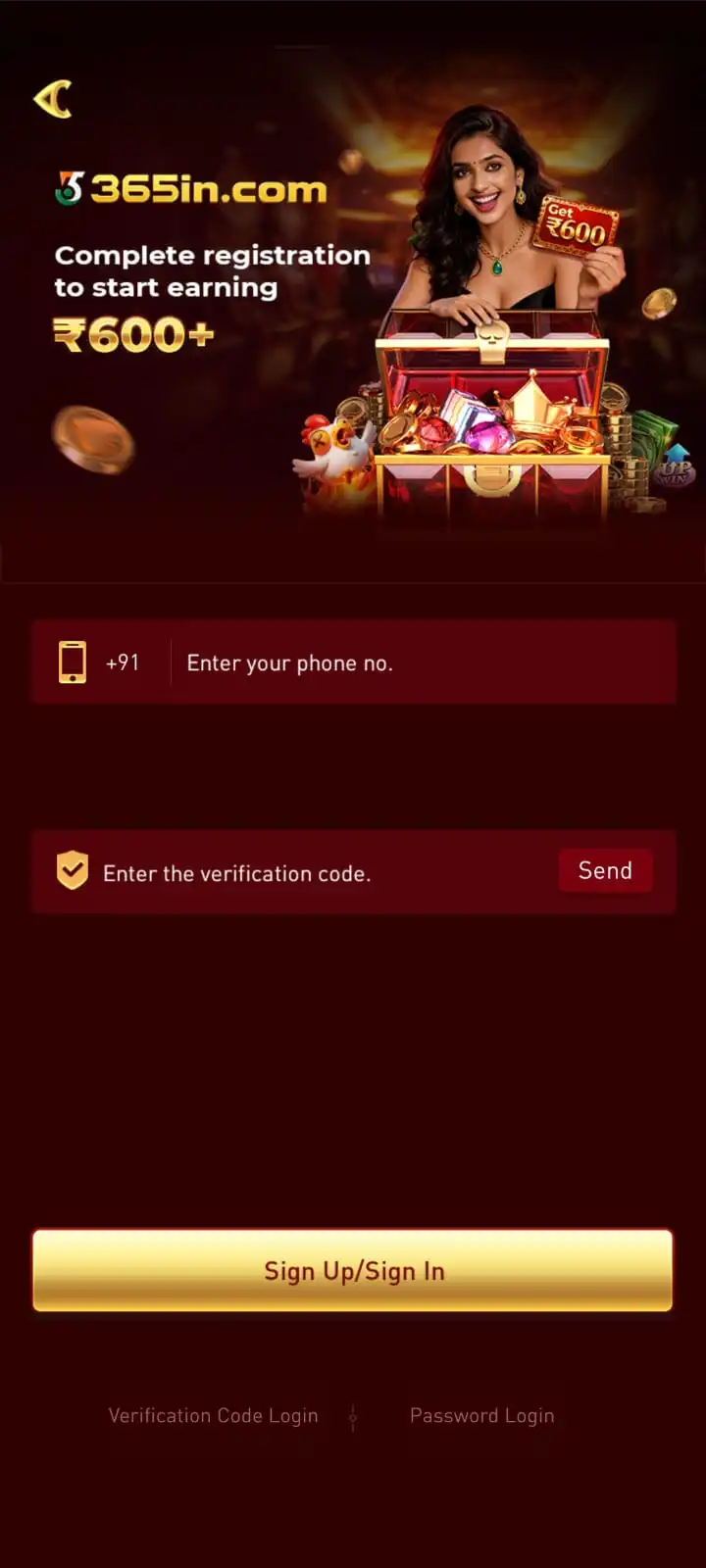
365in Game Registration allows new users to create an account using an active mobile number. The Android app uses SMS OTP verification to confirm the mobile number and complete the registration process.
After installing 365in Game, users can open the app, enter their mobile number and complete verification to access the game lobby and account features.
How to Register for 365in Game
- Open 365in Game: Launch the installed application on your Android device.
- Select Verification Code Login: Choose the mobile verification option on the login screen.
- Enter Mobile Number: Enter your active mobile number using the +91 country code.
- Request OTP: Tap Send to receive an SMS verification code.
- Verify Mobile Number: Enter the received OTP in the verification field.
- Complete Registration: Tap Sign Up / Login to complete verification and access your account.
365in Game Mobile Binding
Mobile binding connects your verified mobile number to your 365in Game account. The registered number is used for OTP verification, account access and password-related security functions.
- Registered Number: Use the same mobile number throughout registration and account setup.
- SMS Verification: Keep your SIM active to receive verification codes.
- Account Access: Complete mobile verification to access registered account features.
- Password Setup: Create a login password through My Profile → My Info → Login Password after registration.
- OTP Security: Keep verification codes and login credentials private.
Download Confirmation vs Account Registration
Account Registration: After installation, users complete SMS OTP verification inside the 365in Game app to register and bind their mobile number.
These are two separate processes. Completing download confirmation does not automatically complete account registration.
After registration, users can set a login password for future account access. For login instructions and password recovery, visit the 365in Login and Registration Guide.
365in Game Login and Password Setup
365in Game Login allows registered users to access their accounts using SMS OTP verification or a saved login password. The Android app provides two account access options: Verification Code Login and Password Login.
New users can sign in through mobile-number verification, while returning users can use their registered mobile number and previously created password.
How to Login to 365in Game Using OTP
- Open 365in Game: Launch the installed application.
- Select Verification Code Login: Choose the OTP login option.
- Enter Mobile Number: Enter your registered mobile number using the +91 country code.
- Request OTP: Tap Send to receive an SMS verification code.
- Enter Verification Code: Type the received OTP into the verification field.
- Complete Login: Tap Sign Up / Login to access your account.
How to Set 365in Game Login Password
- Open My Profile after accessing your 365in Game account.
- Select My Info.
- Tap Login Password.
- Enter your registered mobile number.
- Tap Send and enter the received SMS verification code.
- Create a login password containing 8–32 characters.
- Enter the same password in Confirm Password.
- Tap Complete to save your login password.
365in Password Login for Returning Users
- Open 365in Game and select Password Login.
- Enter your registered mobile number.
- Type your saved login password.
- Review the entered details.
- Tap Sign Up / Login to access your account.
Forgot 365in Game Login Password?
Users who cannot remember their login password can use the Forgot Password option to create a new one.
- Open the Password Login screen.
- Select Forgot Password.
- Enter your registered mobile number.
- Tap Send to request an SMS verification code.
- Enter the received OTP.
- Create and confirm a new password containing 8–32 characters.
- Tap Complete to save the new password.
365in Game Account Security
- Registered Mobile Number: Use the mobile number linked to your account.
- OTP Protection: Keep SMS verification codes private.
- Password Security: Create a unique password and avoid sharing it.
- Account Recovery: Use the Forgot Password option when necessary.
- Safe Login: Enter your credentials only on the intended application login screen.
Verification Code Login uses a temporary SMS code, while Password Login uses the saved account password. Both methods provide access to the same registered 365in Game account.
For additional account instructions, visit the 365in Login and Registration Guide.
365in Game Deposit, Withdrawal and Wallet Guide
365in Game provides a wallet section where registered users can access deposit options, check account balances, manage bank details and submit eligible withdrawal requests. The wallet includes separate Deposit and Withdraw sections, along with transaction records and account-specific payment limits.
365in Game Wallet Features
How to Deposit Money in 365in Game
- Open 365in Game: Sign in to your registered account.
- Go to Wallet: Open Deposit from the account lobby or Wallet.
- Choose Amount: Select an available deposit amount between ₹100 and ₹50,000.
- Select Payment Method: Choose Paytm, PhonePe or QR Code where shown in the account.
- Review Details: Check the amount and payment information displayed.
- Make Payment: Tap Pay Now and follow the payment instructions.
- Confirm Transaction: Complete the payment through your selected payment service.
- Check Wallet: Review the deposit status and updated account balance.
365in Deposit Payment Options
- Paytm: Use the displayed Paytm payment option.
- PhonePe: Complete payment through PhonePe when available.
- QR Code: Scan the displayed QR code and confirm the payment recipient.
- Payment Records: Keep the transaction reference or UTR number for payment verification.
The app provides transaction status information through its wallet section. Users can check pending deposits and contact customer support or use UTR submission if a completed payment has not appeared in their balance.
How to Add a Bank Account in 365in Game
- Open the Withdraw section.
- Select Add New Account.
- Enter the bank account holder's name.
- Enter the bank account number.
- Enter the correct 11-character IFSC Code.
- Review the entered bank details.
- Tap Save & Continue to add the bank account.
How to Withdraw Money from 365in Game
- Open Wallet: Select Wallet → Withdraw.
- Review Balance: Check Cash Balance and Withdrawable Balance.
- Select Bank: Choose your saved receiving bank account.
- Enter Amount: Select or enter an amount within the available withdrawal limit.
- Check Conditions: Review VIP limits, wagering requirements and any displayed withdrawal charges.
- Submit Request: Tap Withdraw to continue.
- Review Status: Check the withdrawal request in the available account records.
Understanding 365in Wallet Balances
- Cash Balance: The amount displayed as the total wallet balance.
- Withdrawable Balance: The portion of funds currently eligible for withdrawal.
- Remaining Withdrawal Limit: The available withdrawal allowance shown for the account.
- VIP Daily Limit: The daily withdrawal limit associated with the account's VIP level.
- Turnover Requirements: Qualifying gameplay requirements that may affect withdrawal eligibility.
Cash Balance and Withdrawable Balance are separate values. Available withdrawal amounts depend on the user's current balance, VIP level and applicable account conditions.
Important Payment and Withdrawal Checks
- Verify the payment recipient before confirming a deposit.
- Check the bank account number and IFSC Code before withdrawal.
- Review the available withdrawal limit and applicable transaction charges.
- Keep deposit references, UTR numbers and withdrawal request details.
- Never share OTPs, passwords or UPI PINs.
- Confirm completed withdrawals through the receiving bank account.
Payment processing, withdrawal limits and account eligibility depend on the conditions displayed in the application.
For detailed deposit instructions, pending transactions, bank account setup, withdrawal limits and UTR submission, visit the 365in Deposit and Withdrawal Guide.
365in Game Review and User Experience
365in Game brings together online game categories, including Aviator, JILI Games, Slots, Rummy, Teen Patti, Fishing and casino-style titles, within an Android application. Its main lobby displays featured games, provider sections, promotional activities and account management options.
The app uses a category-based interface with HOT, CASINO, SLOT, GAMES, FISHING and SPORTS sections. Users can browse available titles, access their profiles and manage wallet-related functions through separate menus.
365in Game Experience Highlights
- Game Variety: Explore Aviator, Fortune Gems, Super Ace, Rummy, Andar Bahar, Chicken Road 2, fishing games and other available titles.
- Organised Game Lobby: Browse categories, featured games and provider collections from the main dashboard.
- App Navigation: Access game titles, promotional banners, wallet functions and account settings through separate sections.
- Mobile Account Access: Use SMS OTP verification or Password Login with a registered mobile number.
- Wallet Features: View Cash Balance, Withdrawable Balance, Deposit, Withdraw and Balance Records.
- Reward Activities: Explore First Deposit offers, Lucky Wheel, VIP benefits, Ranking Rewards and Referral Rewards.
- Account Controls: Manage login password settings through My Profile → My Info and add receiving bank details for withdrawals.
What Makes 365in Game Different?
365in combines multiplier-based games, traditional card games, reel-based slots and interactive fishing titles in one application. Its game lobby features providers such as JILI, Evolution, KoolBet, TopBet and SABA Sports, allowing users to explore different game collections.
The app also separates account settings from wallet functions. Users can manage their login password through My Profile → My Info, while the Wallet section provides access to deposit, withdrawal and account balance information.
Things to Consider Before Playing
- Each game follows its own gameplay rules and result system.
- Available game titles and categories may change with application updates.
- Promotional rewards depend on their eligibility and claim requirements.
- Wallet balances and withdrawable amounts may differ.
- Games involving monetary stakes carry financial risk, and winnings are not guaranteed.
Overall 365in Game Review
365in Game offers multiple game formats through a category-based Android interface. The application combines game collections, mobile account access, wallet management and promotional activities within separate sections.
Its navigation allows users to browse available games, review account settings and access deposit or withdrawal functions. The overall experience depends on individual game preferences, device compatibility and account requirements.
For further information, read the 365in Game Review, explore the 365in Game FAQ, or visit the Responsible Gaming section.
365in Game – Frequently Asked Questions
For additional questions about account access, APK installation, payments and game features, visit the 365in Game FAQ page.